Report Formats
KafkaGuard generates comprehensive reports in multiple formats to suit different use cases. This guide explains each format and when to use them.
Table of Contents
- Report Format Overview
- JSON Reports
- HTML Reports
- PDF Reports
- CSV Reports
- Report Naming Convention
- Next Steps
Report Format Overview
KafkaGuard supports four report formats, each optimized for different use cases:
| Format | Best For | Use Case |
|---|---|---|
| JSON | Automation, CI/CD, programmatic analysis | Pipeline integration, automated processing |
| HTML | Web viewing, quick review | Human-readable reports, sharing with teams |
| Audit trails, compliance documentation | Regulatory audits, executive summaries | |
| CSV | Spreadsheet analysis, data export | Tabular analysis, Excel integration |
Generating Multiple Formats
You can generate multiple report formats in a single scan:
kafkaguard scan \
  --bootstrap kafka:9092 \
  --policy policies/enterprise-default.yaml \
  --format json,html,pdf,csv \
  --out ./reports
This generates all four formats with the same scan ID, making it easy to correlate results across formats.
JSON Reports
JSON reports provide structured data perfect for automation, CI/CD integration, and programmatic analysis.
Use Cases
- CI/CD Pipelines - Parse results to block deployments
- Automated Analysis - Extract metrics and trends
- Integration - Feed data into monitoring systems
- Scripting - Process findings programmatically
Example JSON Structure
{
  "metadata": {
    "scan_id": "abc123def456",
    "timestamp": "2025-11-15T14:30:00Z",
    "cluster_id": "kafka-prod-01",
    "cluster_mode": "kraft",
    "policy": "enterprise-default",
    "policy_version": "1.0"
  },
  "summary": {
    "score": 95,
    "total_controls": 40,
    "passed": 38,
    "failed": 2,
    "not_applicable": 0,
    "severity_breakdown": {
      "high": {"total": 18, "passed": 18, "failed": 0},
      "medium": {"total": 12, "passed": 11, "failed": 1},
      "low": {"total": 10, "passed": 9, "failed": 1}
    }
  },
  "findings": [
    {
      "control_id": "KG-001",
      "title": "SASL authentication enabled",
      "status": "PASSED",
      "severity": "HIGH",
      "category": "security",
      "evidence": "SASL authentication is enabled on all brokers",
      "remediation": "",
      "compliance": {
        "pci_dss": ["8.1", "8.2"],
        "soc2": ["CC6.1"],
        "iso27001": ["A.9.2.1"]
      }
    }
  ]
}
Parsing JSON Reports
Extract overall score:
cat reports/scan-*.json | jq -r '.summary.score'
# Output: 95
List failed controls:
cat reports/scan-*.json | jq -r '.findings[] | select(.status == "FAILED") | "\(.control_id): \(.title)"'
Count HIGH severity failures:
cat reports/scan-*.json | jq '[.findings[] | select(.status == "FAILED" and .severity == "HIGH")] | length'
Extract compliance mappings:
cat reports/scan-*.json | jq '.findings[] | select(.compliance.pci_dss | length > 0) | {control_id, pci_dss: .compliance.pci_dss}'
HTML Reports
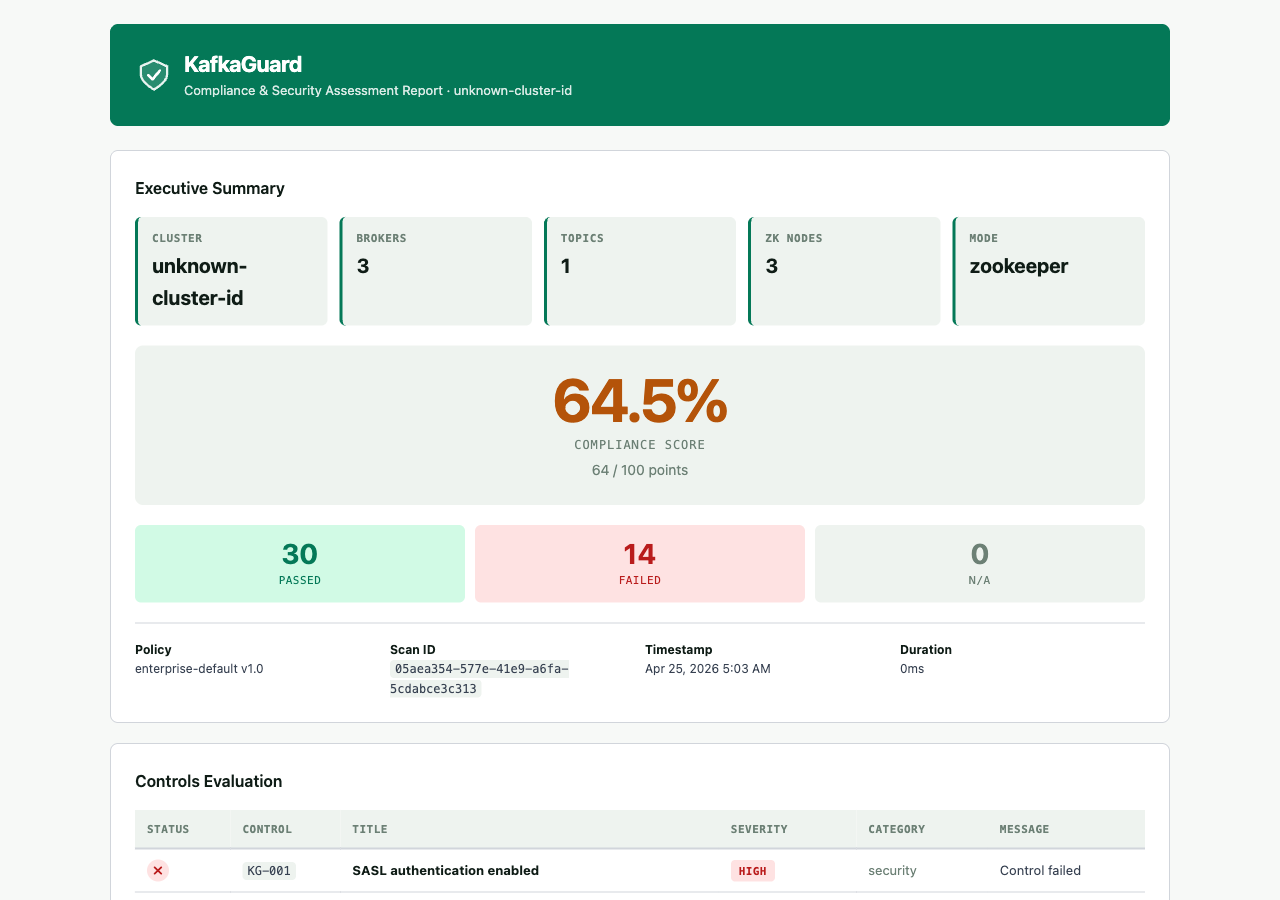
HTML reports provide human-readable, web-viewable reports with executive summaries and detailed findings.
Use Cases
- Quick Review - View results in a browser
- Team Sharing - Share reports via email or web server
- Executive Summaries - High-level overview for stakeholders
- Visual Analysis - Color-coded results and charts
HTML Report Features
- Executive Summary - Overall score and key metrics
- Color-Coded Results - Green (passed), Red (failed), Gray (N/A)
- Detailed Findings - Full control descriptions and remediation
- Compliance Mapping - PCI-DSS, SOC2, ISO 27001 mappings
- Printable Format - Optimized for printing
Viewing HTML Reports
# macOS
open reports/scan-*.html

# Linux
xdg-open reports/scan-*.html

# Or serve via web server
python3 -m http.server 8000
# Then open http://localhost:8000/reports/scan-*.html
PDF Reports
PDF reports are audit-ready documents with professional layout, compliance mappings, and a severity bar chart. They are the recommended format for regulatory audits and executive presentations.
Use Cases
- Regulatory Audits — Printable, signed compliance evidence
- Executive Presentations — Professional layout with score summary
- Historical Records — Archive point-in-time compliance state
- Compliance Sign-off — Optional sign-off page for auditor signatures
PDF Report Features
- Real version — Cover page shows the actual
kafkaguardscanner version, not a placeholder - Severity bar chart — Visual horizontal bars (green = pass, red = fail) per HIGH / MEDIUM / LOW severity in the executive summary
- Compliance Mapping — Detailed PCI-DSS, SOC2, ISO 27001 tables
- Remediation — Actionable fix instructions per failed control
- Optional Sign-off — Append a sign-off page with
--sign-off "Name, Title" - Timestamped — Includes scan metadata and timestamps
- Printable — Optimized for A4 printing and archival
Generating PDF Reports
# Basic PDF generation
kafkaguard scan \
  --bootstrap kafka.prod:9095 \
  --policy policies/enterprise-default.yaml \
  --format pdf \
  --out /var/reports/kafkaguard

# PDF with compliance sign-off page
kafkaguard scan \
  --bootstrap kafka.prod:9095 \
  --policy policies/finance-iso.yaml \
  --format pdf \
  --out /var/reports \
  --sign-off "Jane Smith, CISO"
Sign-Off Page
Pass --sign-off "Name, Title" to append a final page to the PDF:
| Field | Content |
|---|---|
| Prepared by | The name and title you passed to --sign-off |
| Date | Today's date (auto-populated) |
| Signature | Blank line for wet or digital signature |
This is required by many compliance frameworks (PCI-DSS, SOC2, ISO 27001) for audit trail completeness.
Regenerating Historical PDF Reports
Use kafkaguard report generate to create a PDF from any previously saved scan JSON — without re-running a scan.
# From a local JSON file
kafkaguard report generate \
  --input reports/scan-20260425-abc123.json \
  --format pdf \
  --output /tmp/audit-reports \
  --sign-off "Jane Smith, CISO"

# From the on-prem API by scan ID
kafkaguard report generate \
  --scan-id ea8a9a77-... \
  --api http://kafkaguard.internal:3001 \
  --api-key $KAFKAGUARD_API_KEY \
  --format pdf \
  --output /tmp/audit-reports
The regenerated PDF carries the original scanner version embedded in the scan JSON — not the version of the binary that regenerated it. This maintains an honest audit trail.
CSV Reports
CSV reports provide tabular data perfect for spreadsheet analysis and data export.
Use Cases
- Spreadsheet Analysis - Import into Excel or Google Sheets
- Data Export - Extract data for external analysis
- Trend Analysis - Track findings over time
- Custom Reporting - Build custom reports from CSV data
CSV Report Structure
CSV reports include one row per control with the following columns:
control_id- Control identifier (e.g., KG-001)title- Control titlestatus- PASSED, FAILED, or N/Aseverity- HIGH, MEDIUM, or LOWcategory- security, reliability, operational, or complianceevidence- What was foundremediation- How to fix itpci_dss- PCI-DSS requirements (comma-separated)soc2- SOC2 criteria (comma-separated)iso27001- ISO 27001 controls (comma-separated)
Using CSV Reports
Import into Excel:
- Open Excel
- File → Open → Select CSV file
- Data is automatically parsed into columns
Filter failed controls:
# Using csvkit (install: pip install csvkit)
csvgrep -c status -m FAILED reports/scan-*.csv
Count by severity:
# Using awk
awk -F',' 'NR>1 {print $4}' reports/scan-*.csv | sort | uniq -c
Report Naming Convention
All reports follow a consistent naming pattern:
scan-<timestamp>-<scan_id>.<format>
Example:
scan-20251115140530-abc123def456.json
scan-20251115140530-abc123def456.html
scan-20251115140530-abc123def456.pdf
scan-20251115140530-abc123def456.csv
Benefits:
- Chronological Sorting - Timestamp first enables easy sorting
- Easy Correlation - Same scan_id across all formats
- Unique Identifiers - Prevents overwrites
- Glob Pattern Matching - Easy to find reports (
scan-*.json)
Next Steps
- Scanning Guide - Learn how to generate reports during scans
- Configuration Guide - Configure report output directories
- Policy Tiers - Understand how policies affect report content
- Advanced Usage - Learn about report automation and integration
Need Help?
- Scanning Guide - Learn about scan commands
- Configuration Guide - Configure report settings
- GitHub Issues - Report bugs or request features
Ready to get started? Download KafkaGuard and scan your first cluster in under 5 minutes. Download CLI | Quick Start Guide